Thursday, May 28, 2015

Week 15, Day 15: Main Menu

Today I started working on the various menus and buttons to traverse them. The buttons displayed here are not the final buttons that will for the game and are rather testing buttons just to see if they work. They do in case you were wondering. The first one starts the game, the second one brings the player to a tutorial screen and the last button displays the credits. None of these other screens are finished yet but they all exist to some degree or another and have buttons to get back to the main menu. Since I was working on the menus I decided that now would be a pretty good time to get the audio attached to the scenes they were a part of. That ship there also moves too, so it's a nice addition. Next time I work on this I really need to start nailing down more of the game aspects, but for today I'll finish up all of the non game screens because the how to play section is pretty important.

Week 15, Day 14: The Buttons Work!


Today was a good day. I got all of the buttons working the way that they should. All of the plus and minus buttons take the correct amount of resources as well as the collect button actually moving the resources correctly. So after this I have to write a script that does stuff with the variable on the planets and lets them be bought. I also need some way of moving the reserved planets into some kind of reserved zone. So I'm making progress so and steady. Updates should be daily now because I'm taking the game home to work on from now on, so I'll be making more progress within a day.

Week 14, Day ?: Playtesting

Testing was interesting. It appears that the mines are a bit too powerful, and that they should have their points reduces to 1 as well as the number of resources that they give you as well. Also the inventory size should be 10 as well because it makes the game move faster. I'm a little tired at the time of writing this so please forgive any grammatical errors.

Thursday, May 21, 2015

Week 14, Day 13: Big Red Button

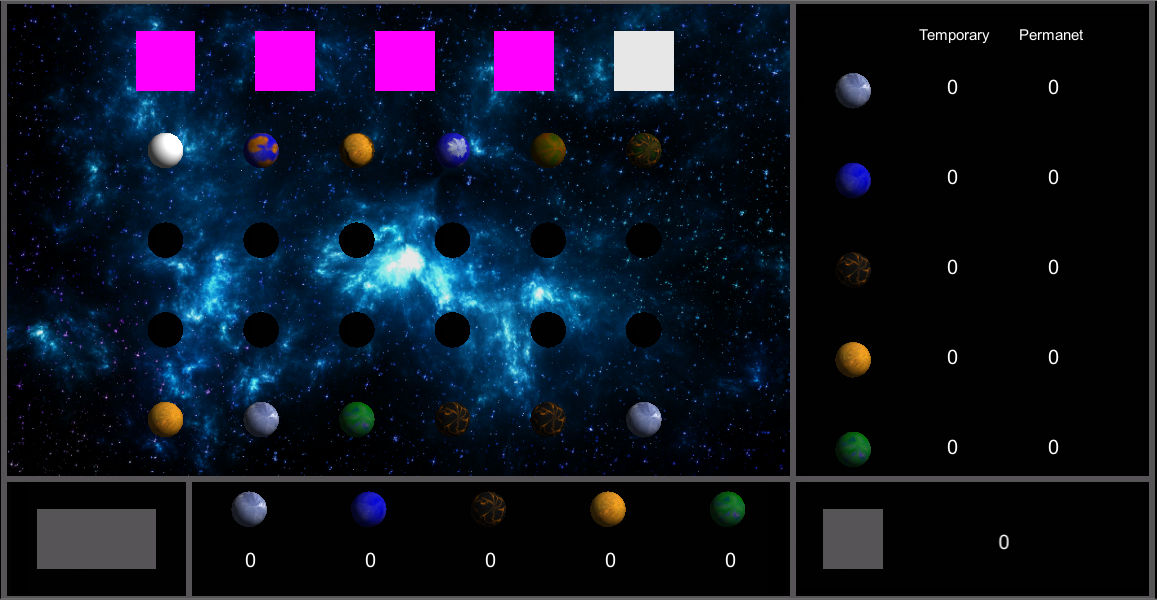
Well I reorganized the way that the game is laid out so that everything looks better. The game was a little cramped in the screen so the camera view was adjusted and so the various components of the game had to have their sizes changed as well. I had to change the sizes of all of the planets and I also moved the tourist so that the planets can have more room. Aside from that though the button had its model attached to it as well as the script that tells it to change color when it is hovered over. I also changed all of the basic text from basic to GUI text so now it can be edited while the game is running. That was a little time consuming but I got through it. I also had to relocate all of the text because it needed to be moved once the screen was re-sized. Overall I would say that I'm in a good position to start scripting the parts that keep track of game actions because next class I can start on the buttons that can tick up or down the number of resources that will be collected in a turn.

Tuesday, May 19, 2015

Week 14, Day 12: Intergalactic Interface

Today I got a whole lot done, but unfortunately a large amount of what I did isn't really usable. You see I did all of that lovely text over there in normal text instead of GUI text so now I can't edit it at run time. Fortunately however all that needs to happen is that the text be changed from normal to GUI so the coordinates of the text can stay the same. That was what took the most time out of the day anyway. After I fix that though I can keep working on the script that will keep track of the values of all of the numbers on the screen so hopefully soon there will be some kind of playable game. At least I did finish the layout though and I also laid out where the buttons will go so that will save some time moving forward. I also got the final background on the game because the prior one was low quality.

Monday, May 18, 2015

Week 13, Day 11: They Appear!

I have a script now that makes the planets able to be visible while the game is running. So now I can change if a planet is visible or not at will during the game. As you can see from the picture to the right I've created a little pattern to show that it can be done. Along with that I have also set about creating the interface that keeps track of the resources that the player has at their disposal and again there is a picture of this to the right. Once I pop numbers into the columns then all I need to do is write a script that keeps track of the amount of each and then that will be done. Now all that I have to do after that Is finish attaching all of the models to the objects in-game and set about writing a script to keep track of all of the variables that I've created across the game objects. Once that is done the game in theory should run all by itself. Should. One more thing that needs to get done is some kind of interface that lets the player take temporary resources into their inventory. Also there needs to be some way of the player acquiring the planets as well. Well, there appears to be quite a bit of work set before me.

Wednesday, May 13, 2015

Week 13, Day 10: The Invisible Planets

 The goal for today was to get the planets that needed to be blacked out blacked out while still having access to their original textures. How to do this? First I created a Boolean to keep track of weather the planet was visible or not. That was simple enough, but I ran into problems when I attempted to change the textures based on this variable. I tried several ineffective and weird things like attempting to put references to each and every texture within every planet and only using the applicable ones. This would have required me to put 21 references within each prefab so that would have taken a very long time. Every planet only would need two references so I just decided to use two general names. As you can see by the picture to the right I've created a reference to the texture "none" as well as a reference to a texture "norm". For each planet none is always the file blackbox.jpeg  but the reference within norm does vary. The reason for this is so that none can be used when the planet is supposed to be blacked out and "norm" can be used when the planet is its normal color. So far this seems to be working so I shall continue down this route. In other news I also fixed a slight error I didn't know that the game had. Apparently my spawner script was creating six times as many planets and tourists as it needed within the hierarchy so I adjusted the spawn function accordingly. Next class the plan is to (hopefully) attach all the models to the planets and the tourists as well as starting some way of keeping track of the planets that the player owns.