 Today is the day that this game is due and I feel as though I have learned a great deal about Unity3d in this time. Unfortunately however I was unable to finish this game in the allotted time. I guess I shouldn't have tried to do this with just two people because it turned out to be just too much for us. One of the plus sides is that I've written far more scripts during the process of this than I have written before, so that's cool I guess. But after countless hours of arranging GUI text and game objects, creating 25 scripts and 125 prefabs what can I truly say that I have learned? I've learned that arrays are incredibly important when it comes to doing just about anything in programming and I can't really stress this enough. They are really really important. I've learned that the Unity help fourms are my best friends now because when I don't know what's going on chances are someone on the internet does. I've learned that getting the prefabs to reference variables, in scripts, on game objects in the hierarchy, is one of the most difficult things to do. There wasn't reasoning for that last one, it was just really hard and I still haven't figured that one out. Overall I'm pretty proud of the work that I and my teammate have put into this and I will still continue to work on this over the summer. Don't worry I'll still keep updating this over the summer with the work that I've gotten done, though it won't be as frequent as it has been. Bye bye now!
Tuesday, June 9, 2015
Week 17, Day 19: It's Due
Today is the day that this game is due and I feel as though I have learned a great deal about Unity3d in this time. Unfortunately however I was unable to finish this game in the allotted time. I guess I shouldn't have tried to do this with just two people because it turned out to be just too much for us. One of the plus sides is that I've written far more scripts during the process of this than I have written before, so that's cool I guess. But after countless hours of arranging GUI text and game objects, creating 25 scripts and 125 prefabs what can I truly say that I have learned? I've learned that arrays are incredibly important when it comes to doing just about anything in programming and I can't really stress this enough. They are really really important. I've learned that the Unity help fourms are my best friends now because when I don't know what's going on chances are someone on the internet does. I've learned that getting the prefabs to reference variables, in scripts, on game objects in the hierarchy, is one of the most difficult things to do. There wasn't reasoning for that last one, it was just really hard and I still haven't figured that one out. Overall I'm pretty proud of the work that I and my teammate have put into this and I will still continue to work on this over the summer. Don't worry I'll still keep updating this over the summer with the work that I've gotten done, though it won't be as frequent as it has been. Bye bye now!
Friday, June 5, 2015
Week 16, Day 17: Fixing those Reserve Planets

Today was spent mainly fixing the scripts for the reserve planets because there was something off about them. Mainly it was that the ordering for the if statements was off by a line or two. So yeah I restructured my ifs and elses. Also all of the models for the planets are in the game now so that's great! I spent a fair amount of time checking if the references were correct and I also had to switch the models for all of the dark matter planets.
Monday, June 1, 2015
Week 16, Day 16: Reserve List

Today has gone pretty well. I have a script on the three reserve planets that I've created that keeps track of weather it is reserved or not, so that if it is it shows up. If not however it is black so it is invisible against the black background that I have. Once I get the planets up and running I will be able to put the values of the planets into the reserved ones. In this way the reserve planets will act just as real planets and have the same buy action on them. I've also loaded all of the models into the reserve planet script so that they can have the correct model when they are reserved. In many ways this script is similar to the planet info script. Really the only difference is that there are all of the models on this rather than just two. Speaking of similarities I did have to go back and add an isMine variable on the planets and an isTwoColor variable to keep track of if the planets are mines or two colors. This way it is far easier for the reserve planet code to tell if the planets are mines, one color or two.
Thursday, May 28, 2015
Week 15, Day 15: Main Menu

Today I started working on the various menus and buttons to traverse them. The buttons displayed here are not the final buttons that will for the game and are rather testing buttons just to see if they work. They do in case you were wondering. The first one starts the game, the second one brings the player to a tutorial screen and the last button displays the credits. None of these other screens are finished yet but they all exist to some degree or another and have buttons to get back to the main menu. Since I was working on the menus I decided that now would be a pretty good time to get the audio attached to the scenes they were a part of. That ship there also moves too, so it's a nice addition. Next time I work on this I really need to start nailing down more of the game aspects, but for today I'll finish up all of the non game screens because the how to play section is pretty important.
Week 15, Day 14: The Buttons Work!


Today was a good day. I got all of the buttons working the way that they should. All of the plus and minus buttons take the correct amount of resources as well as the collect button actually moving the resources correctly. So after this I have to write a script that does stuff with the variable on the planets and lets them be bought. I also need some way of moving the reserved planets into some kind of reserved zone. So I'm making progress so and steady. Updates should be daily now because I'm taking the game home to work on from now on, so I'll be making more progress within a day.
Week 14, Day ?: Playtesting
Testing was interesting. It appears that the mines are a bit too powerful, and that they should have their points reduces to 1 as well as the number of resources that they give you as well. Also the inventory size should be 10 as well because it makes the game move faster. I'm a little tired at the time of writing this so please forgive any grammatical errors.
Thursday, May 21, 2015
Week 14, Day 13: Big Red Button

 Well I reorganized the way that the game is laid out so that everything looks better. The game was a little cramped in the screen so the camera view was adjusted and so the various components of the game had to have their sizes changed as well. I had to change the sizes of all of the planets and I also moved the tourist so that the planets can have more room. Aside from that though the button had its model attached to it as well as the script that tells it to change color when it is hovered over. I also changed all of the basic text from basic to GUI text so now it can be edited while the game is running. That was a little time consuming but I got through it. I also had to relocate all of the text because it needed to be moved once the screen was re-sized. Overall I would say that I'm in a good position to start scripting the parts that keep track of game actions because next class I can start on the buttons that can tick up or down the number of resources that will be collected in a turn.
Tuesday, May 19, 2015
Week 14, Day 12: Intergalactic Interface
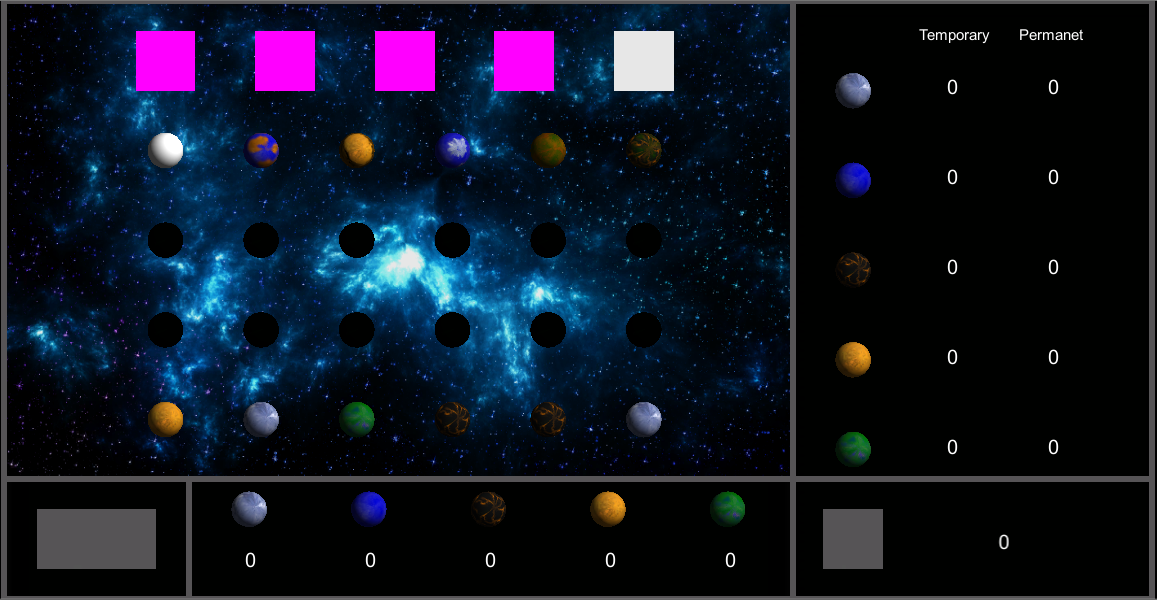
Today I got a whole lot done, but unfortunately a large amount of what I did isn't really usable. You see I did all of that lovely text over there in normal text instead of GUI text so now I can't edit it at run time. Fortunately however all that needs to happen is that the text be changed from normal to GUI so the coordinates of the text can stay the same. That was what took the most time out of the day anyway. After I fix that though I can keep working on the script that will keep track of the values of all of the numbers on the screen so hopefully soon there will be some kind of playable game. At least I did finish the layout though and I also laid out where the buttons will go so that will save some time moving forward. I also got the final background on the game because the prior one was low quality.
Monday, May 18, 2015
Week 13, Day 11: They Appear!

 I have a script now that makes the planets able to be visible while the game is running. So now I can change if a planet is visible or not at will during the game. As you can see from the picture to the right I've created a little pattern to show that it can be done. Along with that I have also set about creating the interface that keeps track of the resources that the player has at their disposal and again there is a picture of this to the right. Once I pop numbers into the columns then all I need to do is write a script that keeps track of the amount of each and then that will be done. Now all that I have to do after that Is finish attaching all of the models to the objects in-game and set about writing a script to keep track of all of the variables that I've created across the game objects. Once that is done the game in theory should run all by itself. Should. One more thing that needs to get done is some kind of interface that lets the player take temporary resources into their inventory. Also there needs to be some way of the player acquiring the planets as well. Well, there appears to be quite a bit of work set before me.
Wednesday, May 13, 2015
Week 13, Day 10: The Invisible Planets

 The goal for today was to get the planets that needed to be blacked out blacked out while still having access to their original textures. How to do this? First I created a Boolean to keep track of weather the planet was visible or not. That was simple enough, but I ran into problems when I attempted to change the textures based on this variable. I tried several ineffective and weird things like attempting to put references to each and every texture within every planet and only using the applicable ones. This would have required me to put 21 references within each prefab so that would have taken a very long time. Every planet only would need two references so I just decided to use two general names. As you can see by the picture to the right I've created a reference to the texture "none" as well as a reference to a texture "norm". For each planet none is always the file blackbox.jpeg but the reference within norm does vary. The reason for this is so that none can be used when the planet is supposed to be blacked out and "norm" can be used when the planet is its normal color. So far this seems to be working so I shall continue down this route. In other news I also fixed a slight error I didn't know that the game had. Apparently my spawner script was creating six times as many planets and tourists as it needed within the hierarchy so I adjusted the spawn function accordingly. Next class the plan is to (hopefully) attach all the models to the planets and the tourists as well as starting some way of keeping track of the planets that the player owns.
Monday, May 11, 2015
Week 13, Day 9: Randomization and Spawning are Done

 Today I've finally removed all of the planets and the tourists from the hierarchy and all of them prefabs. Because of this I had to change the references within all of my arrays from the Game Objects in the hierarchy to the newly created prefabs in their respective folders. These folders were organized in the same way that I originally had the planets organized in the hierarchy as to maintain some normalcy. I also started to attach models to the grade four planets but I only have five of the fifteen models from my assets department so that is as far as I have gotten. Similarly with the tourists I have attached the needed tools to render them for when the models are handed over so that they can just be attached once they are ready. That's why some of the objects on the right are pink they are missing models so the default makes them pink. As you can see however the randomization of the planets works well since these two images are of consecutive tests of the game. Also my assets manager found a better background image so I put that in as well. As for next class hopefully I will be able to finish putting all of the models together and start making this a playable game.
Thursday, May 7, 2015
Week 12, Day 8: The Prefabination of the Solar System
 Today my partner handed off the models for the planets so I went about attaching them to each of the planets that they needed to. I also decided that it would be easier to work with if all of the planets were just prefabs so I made all of them prefabs and organized them in a similar way to how they were in the hierarchy originally. The rotate script was also attached to the planets today as well so now instead of having ugly plain white planets I now have colorful, correctly lighted and rotating planets. All in all a good days work and now that I have this done writing the spawning algorithm should be far easier than it was before.
Tuesday, May 5, 2015
Week 12, Day 7: Interplanetary Shuffling

Today was spent learning how to shuffle game objects within an array upon the game starting. This was so that the objects would go back to their original and organized state when the game was not getting played. Needless to say there were several problems mainly when I was referencing the given variables because the algorithm itself was sound. Once I was done with this however I was able to apply this function to all of the arrays that needed it so essentially the "decks" of the grade one through four planets. This was also applied to the tourists for the same reasons. I also started working on a way of spawning the planets within the game but stumbled upon a few problems. One of which was weather to remove all of the planets from the hierarchy and make them all prefabs so that they could be created and destroyed more easily or weather to keep them as part of the hierarchy. I am still unsure of how to move the planets into their correct positions based on the spawn points that I have created however so that will need to be fixed the next time that I work on this. That I presume will take the entire class to get all of the spawns working for the grade one through four planets along with the tourists.
Friday, May 1, 2015
Week 11, Day 6: Spring Cleaning
 Today I had significantly less time than usual to get work done on the project having only roughly 40 mins in total rather than close to three hours. Needless to say I was far less productive than I've usually been. So rather than attempting to start writing new scripts and get about halfway through before finishing I decided to do a bit of cleaning within the project by better organizing and sub-categorizing the game objects further for ease of access and adding the titles of each planet in front of each instance rather than calling them just one, two, three, etc. Also the tourists were subdivided into two categories based on weather they were two or three colors and due to the way that I have referenced the game objects there don't need to be any changes to the way that they are within the arrays. Overall not the post productive day but necessary evils were taken care of. Next up is the play test that I mentioned in my last post as well as starting the shuffling script that I had started to talk about.
Week 11, Day 5: Eyeball Melting Goodness
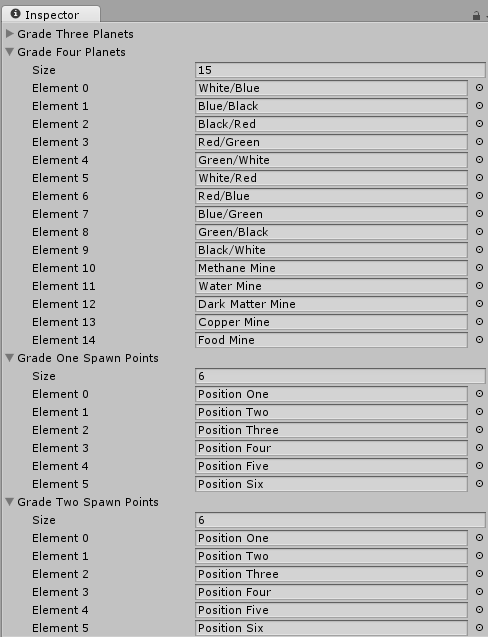 Today I was the most productive that I have been this whole project. I created the script that I mentioned in the last post. I even modified the planets script to include a checklist of the colors that the planets are. But the majority of my time was spent checking boxes, plugging in numbers and dragging around 125 different game objects into five arrays. I also changed the spawning locations a bit because they were not as evenly spaced as I first thought so it's good that I caught that when I did. So in total today I've spent about three hours straight looking at a computer monitor so needless to say my eyes feel fantastic, as I'm sure you can tell by the title. After this I plan on play testing the first version of the game this weekend to see if all of the game play changes are fun and balanced. I also plan on creating some kind of script that shuffles the game objects within their arrays so that the "decks" or arrays rather are randomized at the start of each game. The same type of script would be applied to the Tourists.
Week 11, Day 4: Scripting Starts
 These this and the next post are being written after they took place so keep that in mind as I will be writing in the present tense. Today I decided to get some of the groundwork in place by creating a script that rotates the planets upon spawning. I also wrote a script that tracks the information about the planets as well as creating the spawn points for the planets. Aside from that I also created a background plane for the background to go on at a later date as well as creating and attaching spheres to all of the planets. Additionally I created a script that will keeps track of the information about the tourists. After this I plan on creating a script that just holds all of the game objects and shuffles them but keeps the decks separate as well. So there will be five arrays in total to keep track of within that script. Along with creating the script I will also be creating the tourists and filling them with their pertinent information.
Thursday, April 23, 2015
Week 10, Day 3: The Prototype
Today I made the physical prototype for the game. Now I know that that doesn't sound like a whole lot, but trust me if you have to make a game from scratch it is a large amount of work. I made on just three hours 105 game cards and 20 different tourists. That's about it for today so see you next week!
Wednesday, April 22, 2015
Week 10, Day 2: Splendor Strikes Back
 There were interesting developments on the project over the past day or so including a change to the game play that will hopefully not only differentiate this game more from Splendor but also to give more of a space exploration feel. The main change from Splendor was to have six cards in each row rather than four and to turn face down the row two and three cards. The way that the row two and three cards were turned face up was if the card directly in front of it was purchased. Additionally players couldn't purchase cards from rows beyond what they had cards from. For example I could not have purchased a row two card without owning a row one card. Similarly I can;t buy a row three card without first having a row two card. Not only was that rule change made but also all of the re balanced cards were finished along with the design doc. I also organised the files within the game folder more and have started outlining a physical prototype. Till next class loyal reader!
Wednesday, April 15, 2015
Week 9, Day 1: Let the Splendor Commence!

Thursday, April 9, 2015
Week 8: Tutorial Over
 What can I say after coming to the end of this process? Is the only thing I can say that I have learned how to use JavaScript? No for I have learned far more than just that. I was thrust into a world that I knew nothing about and I was forced to learn from others before me. I have spent hours pouring over forums and the Unity Script API just to learn how to do simple things that should have only taken a few minutes to code and after each of those experiences I came out with a new piece of knowledge that was not handed to me. Granted I had some help along the way from a few of my classmates and most importantly from my teacher but I found that bashing my head against the wall for a bit then finding the right answer just made it stuck all the more. Also during this time I have been free to explore the workings of Unity a bit more than my other classmates. In doing this I learned many lessons about this engine the hard way because for every one or two interesting failures that I had shared with others there were ten or so just downright confusing ones. For instance I had ships flying backwards, I've had to deal with lazers that bounced off of one another and I've crashed Unity several times now with more parts of code that I would care to mention. What I learned from these though was to isolate the problem. Checking individual things as I went along was the biggest help in developing my projects so that when things went wrong I knew what was causing it. All in all I feel as though I am ready to step into the many and varied splendors of creating my own game. Stay tuned this isn't the end oh no! There will be bi-daily updates on weekdays tracking my progress in developing the game so stick around to see me inexplicably happy, utterly confused and possibly hear me make vauge undirected threats about Unity as a whole. So stick around it's going to be one wild ride.
Subscribe to:
Posts (Atom)